Deploy: Docker Compose
This guide walks you through deploying Llamenos with Docker Compose on a single server. You’ll have a fully functional hotline with automatic HTTPS, PostgreSQL database, object storage, Nostr relay, and optional transcription — all managed by Docker Compose.
Prerequisites
- A Linux server (Ubuntu 22.04+, Debian 12+, or similar)
- Docker Engine v24+ with Docker Compose v2
openssl(pre-installed on most systems)- A domain name with DNS pointing to your server’s IP
Quick start (local)
git clone https://github.com/rhonda-rodododo/llamenos-platform.git
cd llamenos-platform
./scripts/docker-setup.sh
Visit http://localhost:8000 and follow the setup wizard.
Production deployment
./scripts/docker-setup.sh --domain hotline.yourorg.com --email admin@yourorg.comThe setup script:
- Generates strong random secrets (database password, HMAC key, storage credentials, Nostr relay secret)
- Writes them to
deploy/docker/.env - Builds and starts all services using the production overlay
- Waits for the app to become healthy
The production overlay (docker-compose.production.yml) adds:
- TLS termination via Let’s Encrypt (Caddy)
- Log rotation for all services (10 MB max, 5 files)
- Resource limits (1 GB memory for the app)
- Strict CSP — only
wss://WebSocket connections
Visit https://hotline.yourorg.com and follow the setup wizard.
Manual setup
cd deploy/docker
cp .env.example .env
Edit .env and fill in the required secrets:
# Hex secrets (HMAC_SECRET, SERVER_NOSTR_SECRET):
openssl rand -hex 32

# Passwords (PG_PASSWORD, MINIO_ACCESS_KEY, MINIO_SECRET_KEY):
openssl rand -base64 24
DOMAIN=hotline.yourorg.com
ACME_EMAIL=admin@yourorg.com
ADMIN_PUBKEY=your_hex_pubkey # from bun run bootstrap-adminStart with the production overlay:
docker compose -f docker-compose.yml -f docker-compose.production.yml up -dDocker Compose files
| File | Purpose |
|---|---|
deploy/docker/docker-compose.yml | Base configuration — all services, networks, volumes |
deploy/docker/docker-compose.production.yml | Production overlay — TLS Caddyfile, log rotation, resource limits |
deploy/docker/docker-compose.dev.yml | Development overlay — exposes app port, file watching |
deploy/docker/docker-compose.ci.yml | CI overlay — deterministic test environment |
Local development uses the dev overlay. Production stacks the production overlay on top of the base.
Core services
| Service | Purpose | Port |
|---|---|---|
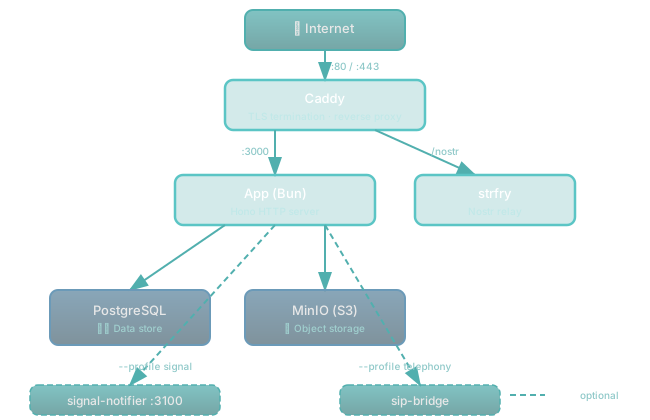
| app | Llamenos application (Bun + Hono) | 3000 (internal) |
| postgres | PostgreSQL database | 5432 (internal) |
| caddy | Reverse proxy + automatic TLS | 8000 (local), 80/443 (production) |
| minio | S3-compatible file storage | 9000 (internal) |
| strfry | Nostr relay for real-time events | 7777 (internal) |
Optional profiles
Start optional services with --profile:
# Signal messaging sidecar
docker compose -f docker-compose.yml -f docker-compose.production.yml --profile signal up -d

# Asterisk/FreeSWITCH/Kamailio SIP bridge (PBX_TYPE selects backend)
docker compose -f docker-compose.yml -f docker-compose.production.yml --profile telephony up -d

# Ollama/vLLM inference for message extraction
docker compose -f docker-compose.yml -f docker-compose.production.yml --profile inference up -d

# Prometheus + Grafana monitoring
docker compose -f docker-compose.yml -f docker-compose.production.yml --profile monitoring up -d
SIP bridge
The sip-bridge service connects Llamenos to a self-hosted PBX. Set PBX_TYPE in .env to select the backend:
PBX_TYPE=asterisk      # Asterisk ARI
# PBX_TYPE=freeswitch  # FreeSWITCH ESL
# PBX_TYPE=kamailio    # Kamailio
Also required: ARI_PASSWORD and BRIDGE_SECRET.
Signal notifier sidecar
The signal-notifier service runs on port 3100. It resolves Signal contacts via HMAC-hashed identifiers — it never stores plaintext phone numbers. Configure:
SIGNAL_NOTIFIER_BEARER_TOKEN=your_shared_token # must match in both app and sidecarHealth checks
The app exposes:
GET /health/ready— ready when DB connected and migrations appliedGET /health/live— alive check
curl https://hotline.yourorg.com/health/ready
# {"status":"ok"}
Verify deployment
cd deploy/docker
docker compose -f docker-compose.yml -f docker-compose.production.yml ps
docker compose -f docker-compose.yml -f docker-compose.production.yml logs app --tail 50
curl https://hotline.yourorg.com/health/ready
Configure webhooks
Point your telephony provider’s webhooks to your domain:
| Webhook | URL |
|---|---|
| Voice (incoming) | https://hotline.yourorg.com/api/telephony/incoming |
| Voice (status) | https://hotline.yourorg.com/api/telephony/status |
| SMS | https://hotline.yourorg.com/api/messaging/sms/webhook |
https://hotline.yourorg.com/api/messaging/whatsapp/webhook | |
| Signal | Forward to https://hotline.yourorg.com/api/messaging/signal/webhook |
Updating
cd deploy/docker
git -C ../.. pull
docker compose -f docker-compose.yml -f docker-compose.production.yml build
docker compose -f docker-compose.yml -f docker-compose.production.yml up -d
Data persists in Docker volumes (postgres-data, minio-data, etc.) across restarts and rebuilds.
Backups
PostgreSQL
docker compose -f docker-compose.yml -f docker-compose.production.yml exec postgres \
  pg_dump -U llamenos llamenos > backup-$(date +%Y%m%d).sql
Restore:
docker compose -f docker-compose.yml -f docker-compose.production.yml exec -T postgres \
  psql -U llamenos llamenos < backup-20250101.sql
Automated backups (cron)
# /etc/cron.d/llamenos-backup
0 3 * * * root cd /opt/llamenos/deploy/docker && \
  docker compose -f docker-compose.yml -f docker-compose.production.yml exec -T postgres \
  pg_dump -U llamenos llamenos | gzip > /backups/llamenos-$(date +\%Y\%m\%d).sql.gz
Logs
cd deploy/docker

# All services
docker compose -f docker-compose.yml -f docker-compose.production.yml logs -f

# Specific service
docker compose -f docker-compose.yml -f docker-compose.production.yml logs -f app

# Last 100 lines
docker compose -f docker-compose.yml -f docker-compose.production.yml logs --tail 100 app
Troubleshooting
App won’t start
docker compose logs app
docker compose config   # verify .env loaded
docker compose ps       # check service health
Certificate issues
Caddy needs ports 80 and 443 open for ACME challenges:
docker compose logs caddy
curl -I http://hotline.yourorg.com
Service architecture
Next steps
- Kubernetes Deployment — horizontal scaling with Helm
- Co-op Cloud Deployment — cooperative hosting
- Telephony Providers — configure voice providers