Deploy: Co-op Cloud
This guide walks you through deploying Llamenos as a Co-op Cloud recipe. Co-op Cloud uses Docker Swarm with Traefik for TLS termination and the abra CLI for standardized app management — ideal for tech co-ops and small hosting collectives.
The recipe is maintained in a standalone repository.
Prerequisites
- A server with Docker Swarm initialized and Traefik running as the reverse proxy
- The
abraCLI installed on your local machine - A domain name with DNS pointing to your server’s IP
- SSH access to the server
If you’re new to Co-op Cloud, follow the Co-op Cloud setup guide first.
Quick start
# Add your server (if not already added)
abra server add hotline.example.com

# Clone the recipe (abra looks for recipes in ~/.abra/recipes/)
git clone https://github.com/rhonda-rodododo/llamenos-template.git \
  ~/.abra/recipes/llamenos

# Create a new Llamenos app
abra app new llamenos --server hotline.example.com --domain hotline.example.com

# Generate all secrets
abra app secret generate -a hotline.example.com

# Deploy
abra app deploy hotline.example.com
Visit https://hotline.example.com and follow the setup wizard to create your admin account.
Core services
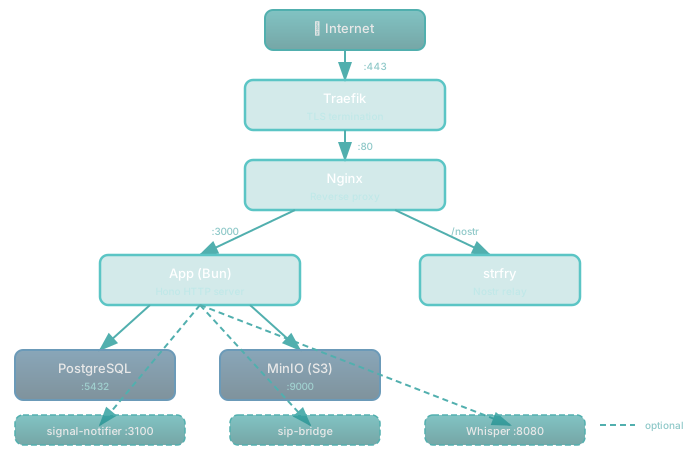
The recipe deploys five services:
| Service | Image | Purpose |
|---|---|---|
| web | nginx:1.27-alpine | Reverse proxy with Traefik labels |
| app | ghcr.io/rhonda-rodododo/llamenos-platform | Bun application server |
| db | postgres:17-alpine | PostgreSQL database |
| minio | minio/minio | S3-compatible file storage |
| relay | dockurr/strfry | Nostr relay for real-time events |
Secrets
All secrets are managed via Docker Swarm secrets (versioned, immutable):
| Secret | Type | Description |
|---|---|---|
hmac_secret | hex (64 chars) | HMAC signing key for session tokens |
server_nostr | hex (64 chars) | Server Nostr identity key |
db_password | alnum (32 chars) | PostgreSQL password |
minio_access | alnum (20 chars) | MinIO access key |
minio_secret | alnum (40 chars) | MinIO secret key |
Generate all secrets at once:
abra app secret generate -a hotline.example.comTo rotate a specific secret:
# 1. Bump the version in your app config
abra app config hotline.example.com
# Change SECRET_HMAC_SECRET_VERSION=v2

# 2. Generate the new secret
abra app secret generate hotline.example.com hmac_secret

# 3. Redeploy
abra app deploy hotline.example.com
Configuration
Edit the app configuration:
abra app config hotline.example.comKey settings:
DOMAIN=hotline.example.com
LETS_ENCRYPT_ENV=production

# Display name shown in the app
HOTLINE_NAME=My Hotline

# Telephony provider (configure after setup wizard)
# PBX_TYPE=twilio
# TWILIO_ACCOUNT_SID=
# TWILIO_AUTH_TOKEN=
# TWILIO_PHONE_NUMBER=

# Or SignalWire
# PBX_TYPE=signalwire
# SIGNALWIRE_PROJECT_ID=
# SIGNALWIRE_AUTH_TOKEN=
# SIGNALWIRE_PHONE_NUMBER=
# SIGNALWIRE_SPACE_URL=

# Secret versioning (bump to rotate)
SECRET_HMAC_SECRET_VERSION=v1
SECRET_SERVER_NOSTR_VERSION=v1
SECRET_DB_PASSWORD_VERSION=v1
SECRET_MINIO_ACCESS_VERSION=v1
SECRET_MINIO_SECRET_VERSION=v1
First login
After deployment, open your domain in a browser and follow the setup wizard:
- Create your admin account — set a display name and your PIN
- Name your hotline — set the display name shown in the app
- Choose channels — enable Voice, SMS, WhatsApp, Signal, and/or Reports
- Configure providers — enter credentials for each enabled channel
- Review and finish
Configure webhooks
Point your telephony provider’s webhooks to your domain:
- Voice (incoming):
https://hotline.example.com/api/telephony/incoming - Voice (status):
https://hotline.example.com/api/telephony/status - SMS:
https://hotline.example.com/api/messaging/sms/webhook - WhatsApp:
https://hotline.example.com/api/messaging/whatsapp/webhook - Signal: Configure bridge to forward to
https://hotline.example.com/api/messaging/signal/webhook
See provider-specific guides: Twilio, SignalWire, Vonage, Plivo.
Optional: Enable Signal sidecar
For Signal messaging (see Signal setup):
abra app config hotline.example.comSet:
COMPOSE_FILE=compose.yml:compose.signal.yml
SECRET_SIGNAL_NOTIFIER_TOKEN_VERSION=v1
Generate the additional secret and redeploy:
abra app secret generate hotline.example.com signal_notifier_token
abra app deploy hotline.example.com
Optional: Enable SIP bridge
For self-hosted SIP telephony via Asterisk, FreeSWITCH, or Kamailio:
abra app config hotline.example.comSet:
COMPOSE_FILE=compose.yml:compose.telephony.yml
PBX_TYPE=asterisk
SECRET_ARI_PASSWORD_VERSION=v1
SECRET_BRIDGE_SECRET_VERSION=v1
Generate the additional secrets and redeploy:
abra app secret generate hotline.example.com ari_password bridge_secret
abra app deploy hotline.example.com
Optional: Enable transcription
Add the transcription overlay (requires 4 GB+ RAM):
abra app config hotline.example.comSet:
COMPOSE_FILE=compose.yml:compose.transcription.yml
WHISPER_MODEL=Systran/faster-whisper-base
WHISPER_DEVICE=cpu
Then redeploy:
abra app deploy hotline.example.comUse WHISPER_DEVICE=cuda if your server has a GPU.
Updating
abra app upgrade hotline.example.comThis pulls the latest recipe version and redeploys. Data is persisted in Docker volumes and survives upgrades.
Backups
Backupbot integration
The recipe includes backupbot labels for automated PostgreSQL and MinIO backups. If your server runs backupbot, backups happen automatically.
Manual backup
Use the included backup script:
# From the recipe directory
./pg_backup.sh <stack-name>
./pg_backup.sh <stack-name> /backups    # custom directory, 7-day retention
Or back up directly:
# PostgreSQL
docker exec $(docker ps -q -f name=<stack-name>_db) \
  pg_dump -U llamenos llamenos | gzip > backup-$(date +%Y%m%d).sql.gz

# MinIO (object storage)
docker run --rm \
  -v <stack-name>_minio-data:/data \
  -v /backups:/backups \
  alpine tar czf /backups/minio-$(date +%Y%m%d).tar.gz /data
Restore PostgreSQL:
gunzip -c backup-20260101.sql.gz | \
  docker exec -i $(docker ps -q -f name=<stack-name>_db) \
  psql -U llamenos llamenos
Monitoring
Health checks
All services have Docker health checks. Check status:
abra app ps hotline.example.comThe app exposes health endpoints:
curl https://hotline.example.com/health/ready
# {"status":"ok"}
curl https://hotline.example.com/health/live
# {"status":"ok"}
Logs
# All services
abra app logs hotline.example.com

# Specific service
abra app logs hotline.example.com app

# Follow logs in real time
abra app logs -f hotline.example.com app

# Follow all services
abra app logs -f hotline.example.com
abra command reference
| Command | Description |
|---|---|
abra app ps hotline.example.com | Show running containers and health |
abra app logs [-f] hotline.example.com [service] | View (and follow) logs |
abra app config hotline.example.com | Edit app config (opens $EDITOR) |
abra app secret ls hotline.example.com | List secrets and their versions |
abra app secret generate hotline.example.com [name] | Generate one or all secrets |
abra app deploy hotline.example.com | Deploy (or redeploy) the app |
abra app upgrade hotline.example.com | Pull latest recipe and redeploy |
abra app undeploy hotline.example.com | Stop and remove the app (data preserved) |
abra app run hotline.example.com app -- bun run ... | Run a one-off command in the app container |
Service architecture
Troubleshooting
App won’t start
abra app logs hotline.example.com app
abra app ps hotline.example.com
Check that all secrets are generated:
abra app secret ls hotline.example.comMissing secrets appear with an empty version. Generate them:
abra app secret generate hotline.example.comCertificate issues
Traefik handles TLS. Check Traefik logs on your server:
docker service logs traefikEnsure your domain’s DNS resolves to the server and ports 80/443 are open.
Database connection errors
Check the app container can reach PostgreSQL:
abra app run hotline.example.com app -- \
  bun -e "const { sql } = await import('bun'); await sql\`SELECT 1\`; console.log('ok')"
Secret rotation
If a secret is compromised:
- Bump the version in app config:
abra app config hotline.example.com(e.g., changeSECRET_HMAC_SECRET_VERSION=v2) - Generate the new secret:
abra app secret generate hotline.example.com hmac_secret - Redeploy:
abra app deploy hotline.example.com
strfry not connecting
Real-time events require strfry. If you see WebSocket errors:
abra app logs hotline.example.com relay
abra app ps hotline.example.com
Verify the Nginx config routes /nostr to the relay container on port 7777.
Next steps
- Admin Guide — configure the hotline
- Self-Hosting Overview — compare deployment options
- Docker Compose deployment — alternative single-server deployment
- Recipe repository — Co-op Cloud recipe source
- Co-op Cloud documentation — learn more about the platform