Getting Started
Get a Llamenos hotline running locally or on a server. Only Docker is required — no Node.js, Bun, or other runtimes needed on the host.
How it works
When someone calls your hotline number, Llamenos routes the call to all on-shift users simultaneously. The first user to answer gets connected, and the others stop ringing. After the call ends, the user can save encrypted notes about the conversation.
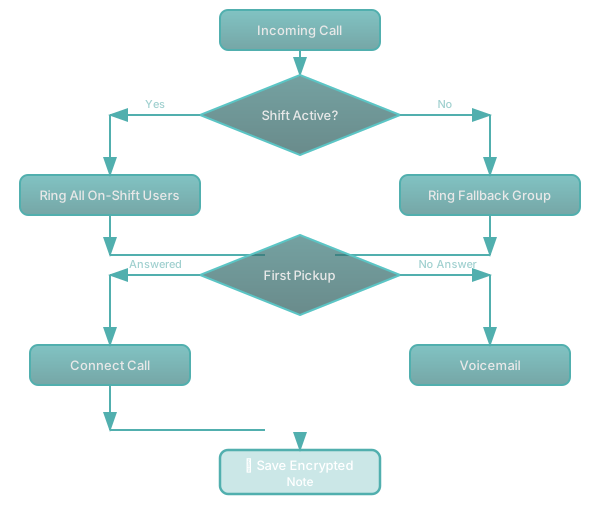
The same routing applies to SMS, WhatsApp, Signal, and other messaging channels — they appear in a unified Conversations view.
Prerequisites
- Docker with Docker Compose v2
openssl(pre-installed on most Linux and macOS systems)- Git
Quick start
git clone https://github.com/rhonda-rodododo/llamenos-platform.git
cd llamenos-platform
./scripts/docker-setup.sh
This generates all required secrets, builds the application, and starts the services. Once complete, visit http://localhost:8000 and follow the setup wizard:
- Create your admin account — set a display name and your PIN
- Name your hotline — set the display name shown in the app
- Choose channels — enable Voice, SMS, WhatsApp, Signal, and/or Reports
- Configure providers — enter credentials for each enabled channel
- Review and finish
Try demo mode
To explore with pre-seeded sample data:
./scripts/docker-setup.sh --demoProduction deployment
For a server with a real domain and automatic TLS:
./scripts/docker-setup.sh --domain hotline.yourorg.com --email admin@yourorg.comCaddy automatically provisions Let’s Encrypt TLS certificates. Make sure ports 80 and 443 are open. The --domain flag activates the production Docker Compose overlay, which adds TLS, log rotation, and resource limits.
See the Docker Compose deployment guide for full details on server hardening, backups, monitoring, and optional services.
Core services
The Docker setup starts these core services:
| Service | Purpose | Port |
|---|---|---|
| app | Llamenos application (Bun) | 3000 (internal) |
| postgres | PostgreSQL database | 5432 (internal) |
| caddy | Reverse proxy + automatic TLS | 8000 (local), 80/443 (production) |
| minio | S3-compatible file storage | 9000 (internal) |
| strfry | Nostr relay for real-time events | 7777 (internal) |
Optional profiles add: signal-notifier sidecar, sip-bridge (Asterisk/FreeSWITCH/Kamailio), Ollama/vLLM inference, Prometheus monitoring.
Health probes
The app exposes two health endpoints used by Docker health checks and Kubernetes probes:
GET /health/ready— returns 200 when the app is ready to serve traffic (DB connected, migrations applied)GET /health/live— returns 200 when the app process is alive
Configure webhooks
After deploying, point your telephony provider’s webhooks to your deployment URL:
| Webhook | URL |
|---|---|
| Voice (incoming) | https://your-domain/api/telephony/incoming |
| Voice (status) | https://your-domain/api/telephony/status |
| SMS | https://your-domain/api/messaging/sms/webhook |
https://your-domain/api/messaging/whatsapp/webhook | |
| Signal | Forward to https://your-domain/api/messaging/signal/webhook |
For provider-specific setup: Twilio, SignalWire, Vonage, Plivo, Asterisk, SMS, WhatsApp, Signal.
Next steps
- Docker Compose Deployment — full production deployment guide with backups and monitoring
- Kubernetes Deployment — deploy with Helm
- Co-op Cloud Deployment — deploy for cooperative hosting collectives
- Telephony Providers — compare voice providers
- Self-Hosting Overview — compare all deployment options